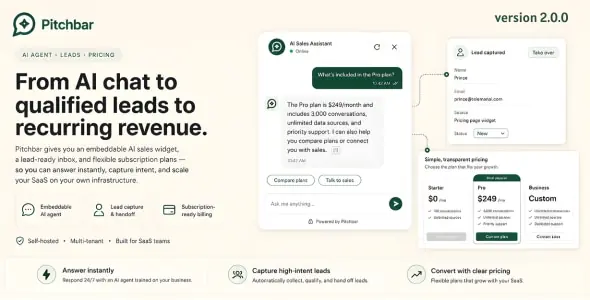
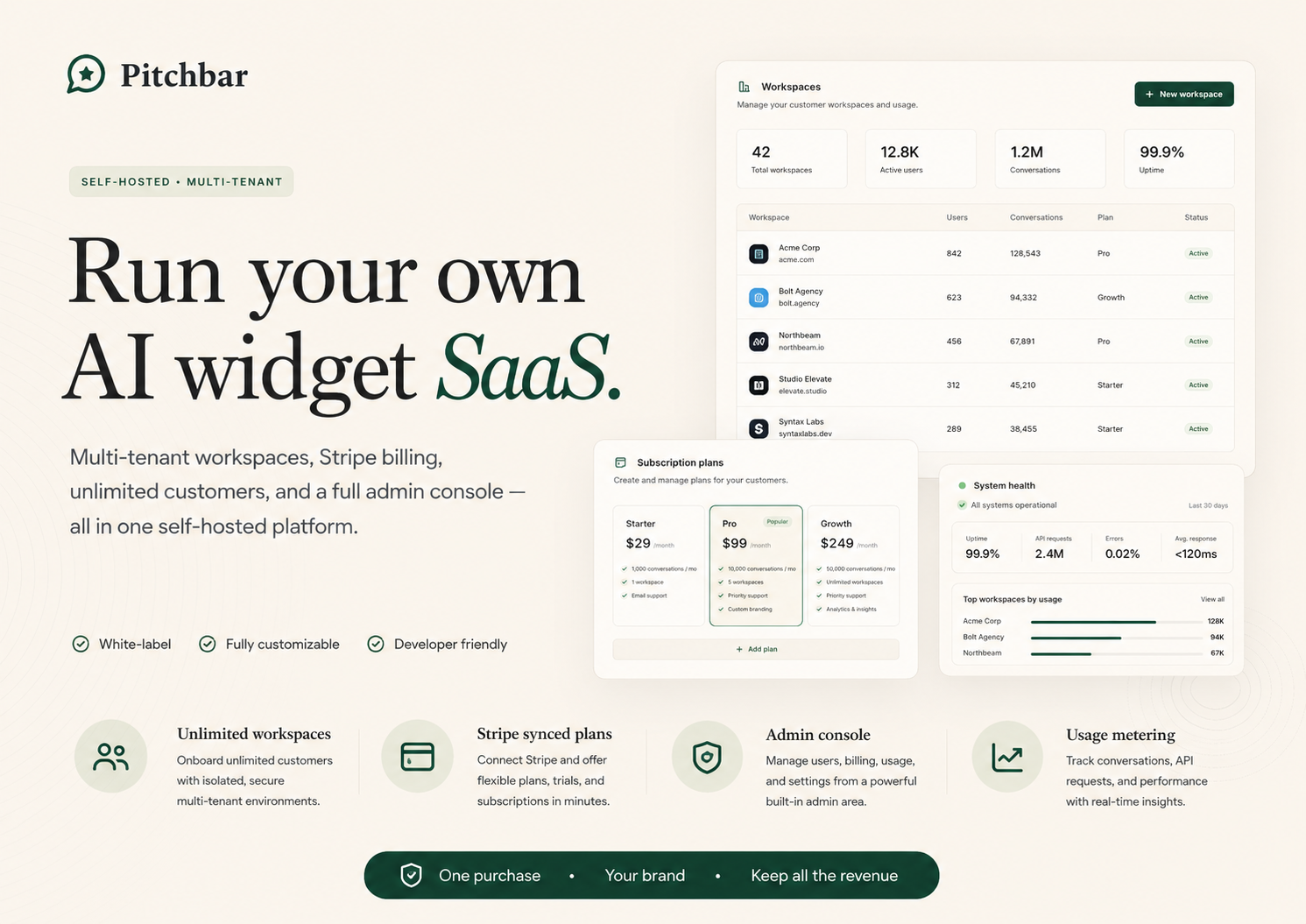
Pitchbar is a complete, multi-tenant SaaS platform you can install on your own server. Every visitor on your site — or your client’s site — gets a sub-second AI sales assistant that learns from your own pages, captures leads, and hands off to a human in real time.
One <script> tag drops the widget on any website — WordPress, Shopify, Next.js, React, Vue, plain HTML, anywhere. The whole stack — agents, knowledge base, inbox, billing, documentation — ships in one Laravel + React application. Run it for yourself, for ten clients, or for a thousand subscribers.
One purchase. Unlimited workspaces. Your data, your infrastructure, your AI.


What’s New in v1.2.0
Sharper widget engagement, reliable behavior triggers, and a proper self-host install guide. Existing buyers get this update for free.
New features
- Suggested follow-up questions. Every answer now ends with up to three tappable follow-up prompts the visitor can click to keep the conversation moving. Reduces the “I don’t know what else to ask” drop-off. Generated automatically from the answer’s context — no setup needed.
- Stage-aware typing indicator. Instead of a generic ”...” dot, the widget tells the visitor exactly what’s happening: Searching your site… while we pull relevant pages, then Thinking… while the AI writes, then the streamed answer. Makes the wait feel deliberate instead of frozen.
- Unread badge + soft chime when minimised. If a visitor walks away from a half-finished reply, the closed bar shows a red unread badge (“1”, “2”, “9+”) and plays a one-time soft tone. They come back, click, and pick up where they left off. Respects the OS “reduce motion” preference; chime fires at most once per session.
- Up to three CTA cards stacked per reply. Configure multiple CTAs with priorities on the same agent — the matching ones render together (Pricing + Demo + Docs side by side) instead of just the top one.
- Lead-form trigger strategy per agent. Four options: Engagement (default — intent + turn count), First message (every visitor sees the form on turn one — best for sales-led agents), Keyword only (no surprise prompts), and Never (chat without lead capture).
- Time-on-page & abandoned-cart behavior triggers. Two new trigger kinds. Time fires N seconds after the page loads. Abandoned cart fires when a WooCommerce visitor’s cart sits idle past the configured threshold (paired with the WordPress companion plugin).
- Self-host installation guide. New /documentation/installation page walks operators from a fresh server to a running deployment in 20–40 minutes — requirements, environment variables, database, asset build, Octane/Horizon/Reverb processes, cron (host or Cloudflare Worker), first admin, smoke test, common troubleshooting.
- Connected WordPress sites surface per agent. The Integrations page in the dashboard lists every WordPress install that connected the companion plugin to one of your agents — site URL, plugin version, WooCommerce status, “Last seen X ago”. Confirms the integration is live without logging into each WP site.
Improvements
- New agents no longer answer “I don’t have enough information” with sources indexed. The default similarity threshold for new agents drops to a Cloudflare-tuned value so visitors get answers from the content you indexed instead of the fallback line. Note for existing agents: if you see the “no information” fallback, open the agent’s Advanced settings and lower the threshold to 0.5.
- Analytics page degrades gracefully. If a single broken column on a stale-schema deploy used to 500 the whole analytics page, the dashboard now renders fine — missing data shows as zeros, a yellow banner explains “some metrics couldn’t be loaded — most likely a pending database migration”, and the rest of the page works normally.
- Customer-safe wording on crawl errors. Sources that failed to crawl no longer leak raw upstream JSON envelopes to your customer. The list now shows short friendly lines like “We couldn’t reach this page” or “The crawl service is busy — we’ll retry automatically”. Operators still see the full raw message under Show details.
- PDF, TXT, DOCX uploads reliably index. A queue worker configuration that excluded the indexing lane for file uploads is fixed. Knowledge uploads flow through and finish within a minute on every deployment.
Fixes
- Behavior triggers (exit-intent, idle, scroll, time, abandoned-cart) now actually fire. Rules configured in the admin saved fine and showed up in the live payload, but a teardown bug detached the listeners milliseconds after they attached — so triggers silently never ran. Caught and fixed end-to-end. Every trigger kind now fires as documented; no reconfiguration needed.
- Three configured CTAs no longer collapse to one. Agents with multiple CTAs render all matching ones (capped at three) instead of just the top-priority one. Existing setups pick up the fix automatically.
- Raw Cloudflare 401 JSON no longer leaks into the Sources list. Auto-indexed sources that hit upstream auth errors now show a sanitized “the crawl service is temporarily unavailable on your workspace” line instead of the raw upstream envelope.
- Analytics dashboard no longer 500s on stale schema. The actual cause of every “Internal Server Error” report on /app/analytics seen in the last few weeks.
Run Your Own SaaS — Out of the Box
Pitchbar is not a chat plugin. It’s a complete SaaS-in-a-box. Install it once, hand customers a sign-up link, and you’re running an AI sales-widget business under your own brand. Every piece needed to operate a real subscription product is included and wired up.
You keep 100% of the subscription revenue minus Stripe’s processing fee. No per-tenant fees from us, no per-conversation tax, no usage-based reseller cost. One Envato license, unlimited workspaces, unlimited end-customers.
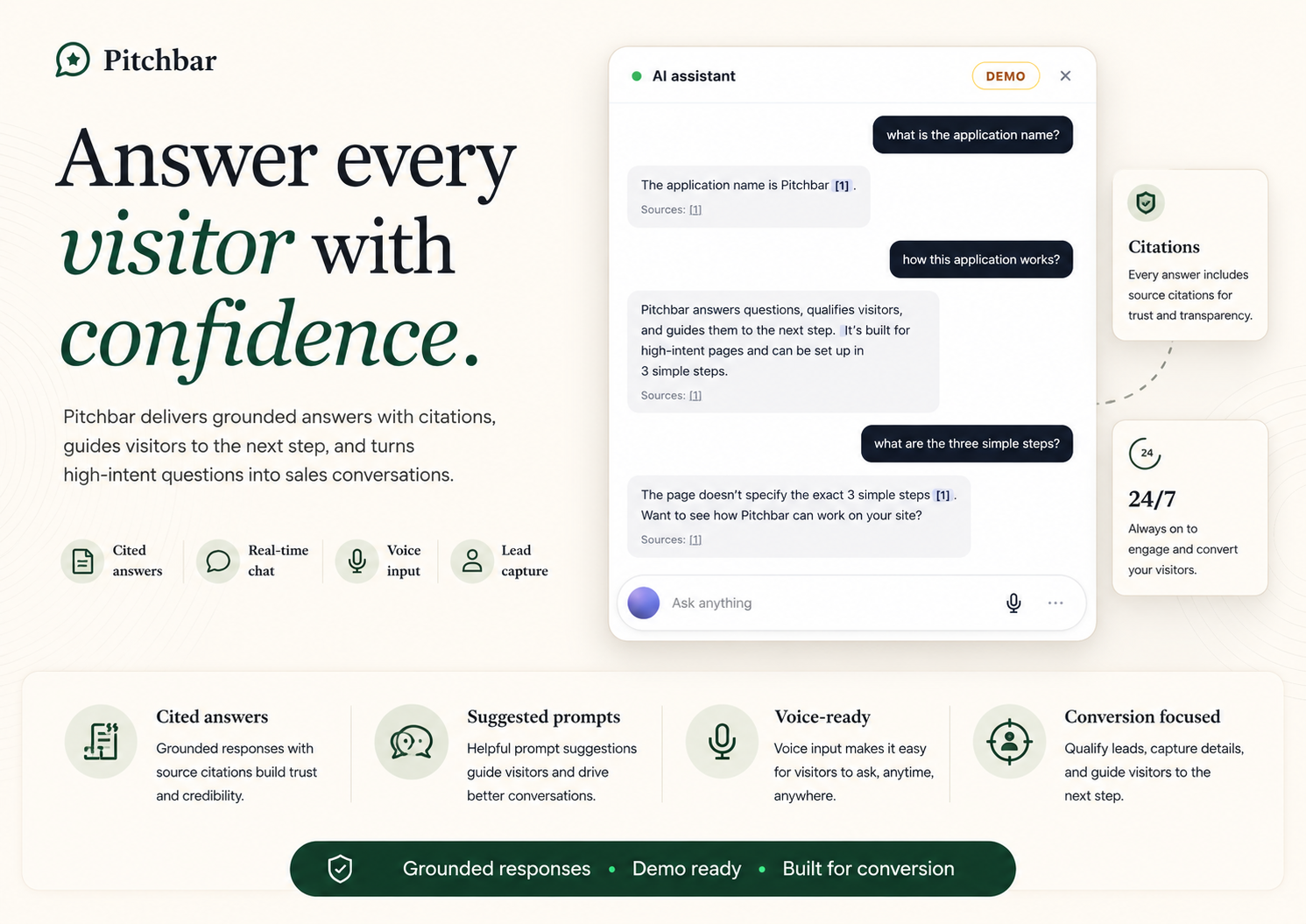
What’s wired for SaaS operation
- Multi-tenant from the database up — every workspace is fully isolated by a global query scope, regression-tested. One customer’s agents, conversations, leads, and analytics can never leak to another.
- Self-serve sign-up — visitor lands on your marketing site, hits “Get started”, goes through Fortify-backed registration, lands in onboarding, picks a plan, pays through Stripe Checkout, deploys their widget — all without you touching a thing.
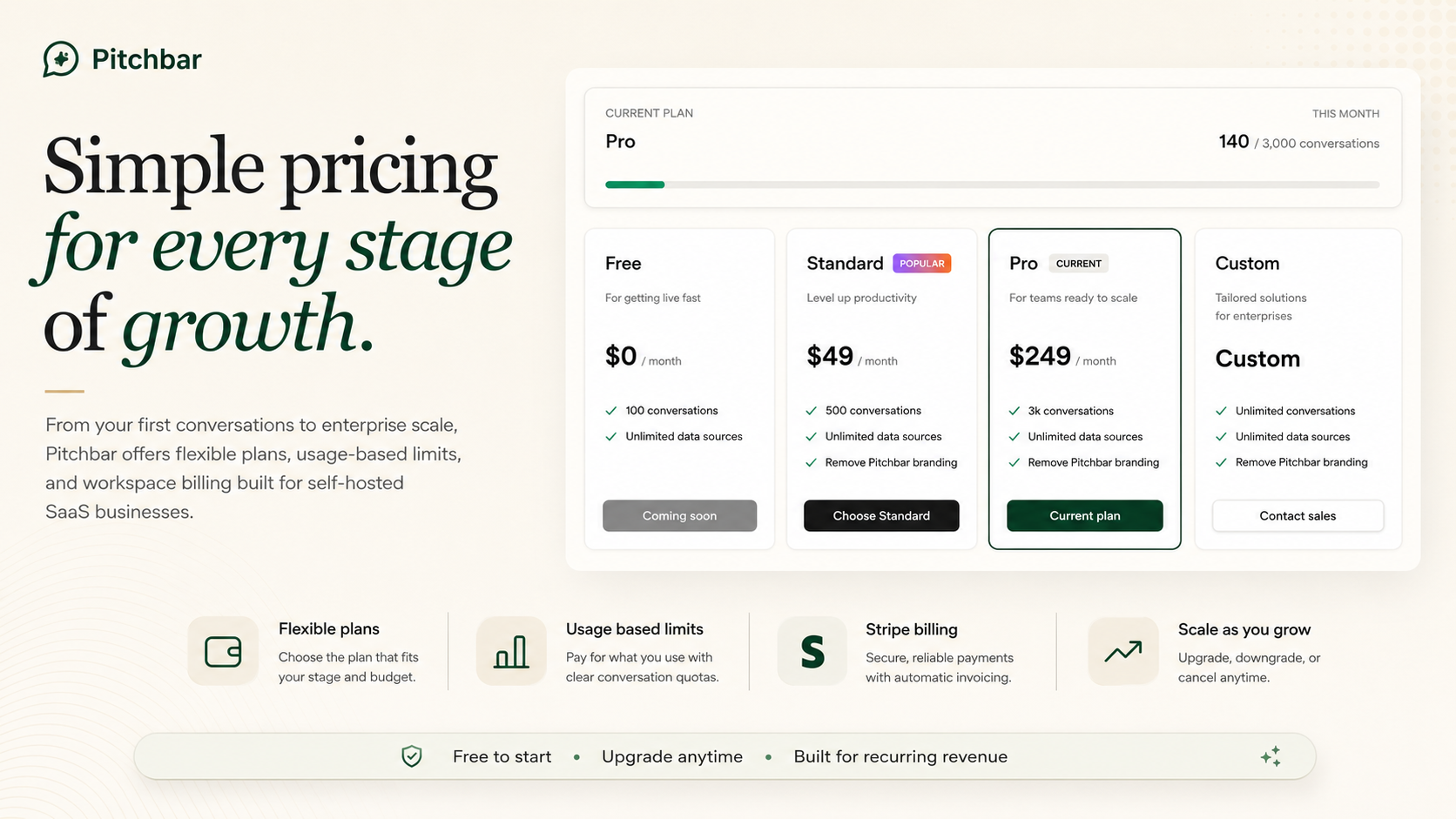
- Stripe-synced plans — define plans inside Pitchbar’s admin console. Stripe Products and Prices are created automatically. Plan changes archive the old Price and mint a new one without breaking existing subscriptions.
- Monthly + annual billing — visitors toggle between monthly and yearly on the pricing page; checkout uses the matching Stripe Price.
- Metered billing — each plan has a monthly conversation quota. Over-quota workspaces get a 429 + friendly upgrade prompt; conversations already in progress finish normally so visitors are never left hanging.
- Customer Portal — Stripe’s hosted portal handles cancellations, card updates, invoice downloads. Zero billing UI you have to build.
- Per-plan feature flags — branding removal, custom widget domain, higher rate limits, integration access, AI rate-limit + max-tokens dials. Add new flags in one line of code.
- Workspace roles & team invitations — Owner / Admin / Editor / Viewer with granular permissions. 7-day invite tokens. Owner transfer with confirmation. Multi-workspace user support out of the box.
- Platform admin console at /admin — manage plans, watch every workspace’s usage, retry failed jobs, impersonate any user for support, monitor site health across seven automated checks.
- Audit log — every privileged action (plan change, role change, ownership transfer, impersonation) is recorded for compliance.
- Quota enforcement on the hot path — gate happens at /api/v1/widget/init, never mid-conversation. Existing chats and human takeovers are never interrupted.
Two licenses, two business models
- Regular License — install Pitchbar on your own infrastructure for your own use. Run it for your team, your portfolio sites, or one client.
- Extended License — run it as a paid service for unlimited end-customers. White-label the marketing site, set your own pricing, and keep all the revenue. Same codebase as Regular License.
The financial model in plain numbers
Set up three plans (Free / Pro / Enterprise) at $0 / $49 / $249. Acquire 100 paying customers averaging the Pro tier — that’s roughly $4,900/month recurring, before any Enterprise upsells. Pitchbar’s external infrastructure cost on Cloudflare’s “one-bill” mode is around $5/month plus per-request usage. The math works whether you sell to ten customers or ten thousand.
Why Pitchbar
- Self-hosted, not SaaS. Pay once, own forever. No per-conversation fees from us. No data leaving your servers. No vendor lock-in.
- Multi-tenant from day one. Each workspace is fully isolated by a global query scope, enforced by a regression test that fails the build on tenancy violations. Run it for one client or one thousand.
- Sub-second responses. The hot path has a 1-second p95 time-to-first-token contract. No DB writes mid-stream, no synchronous webhooks, async persistence after the response completes.
- Provider-flexible AI. Cloudflare Workers AI by default (cheapest path) with OpenAI, OpenRouter, and Qdrant fallbacks. One env var swaps providers — no code changes.
- Real engineering, not a wrapper. Prompt-injection defence, strict origin enforcement, encrypted secrets at rest, multi-language support, OpenTelemetry traces — all included.
- Built-to-rank. Per-page SEO meta + JSON-LD + sitemap.xml + smart robots.txt out of the box. Your marketing site indexes properly from day one.
Core Features1. AI agents grounded in your knowledge
- Build unlimited AI agents per workspace, each with its own persona, theme, system prompt, behaviour rules, and knowledge base.
- Crawl URLs, sitemaps, RSS feeds, paste text, or sync from Notion / Google Docs via OAuth.
- Auto-index every page a visitor lands on (with safety guards — never indexes /admin, /login, /checkout, internal IPs, etc.).
- Two-stage retrieval: ANN recall plus cross-encoder rerank for precision.
- Versioned publishing — every Publish creates an immutable snapshot. Roll back to any prior version with one click.
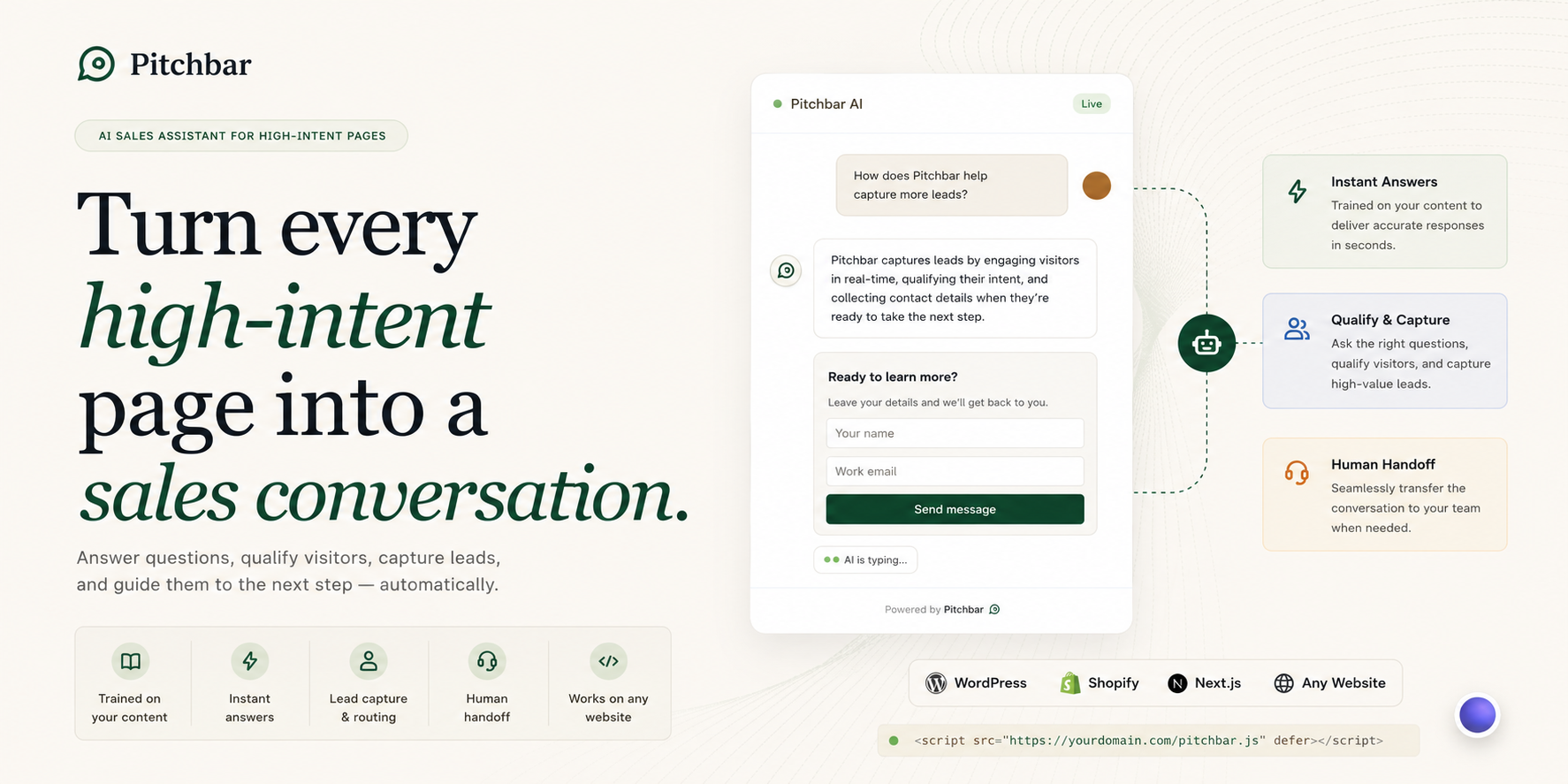
2. Drop-in widget for any website
- One <script> tag, no other setup required.
- Under 50 KB gzipped — fast load, no Lighthouse score impact.
- Renders inside a Shadow DOM — your CSS can’t accidentally style it; the widget can’t accidentally style your site.
- Works on WordPress, Shopify, Next.js, React, Vue, Angular, Astro, plain HTML — any framework that produces HTML.
- Persistent visitor sessions across page loads (24-hour resume window).
- Visitors get streamed answers token-by-token over Server-Sent Events with real-time citations linking to source pages.
- Suggested follow-up questions — every answer ends with up to three tappable prompts that keep the conversation moving. Auto-generated.
- Stage-aware typing indicator — “Searching your site…” while we pull pages, then “Thinking…” while the AI writes, then streamed reply. The wait feels deliberate.
- Unread badge + soft chime when minimised — visitors who walk away mid-reply come back to a red unread badge and a one-time soft tone. Honours OS “reduce motion”.
- Built-in voice microphone — visitors can dictate questions in any of the supported languages.
- Strict origin allow-list — the widget refuses to load on unauthorised domains so nobody can drain your quota.
- Restricted paths — per-agent glob list of URLs (e.g. /admin/*, /checkout) where the widget should NOT mount, configured without code.
- Position picker — centered bar (default), bottom-right floating bubble (Intercom / Drift style), or bottom-left, per agent.
3. Real-time inbox + human takeover
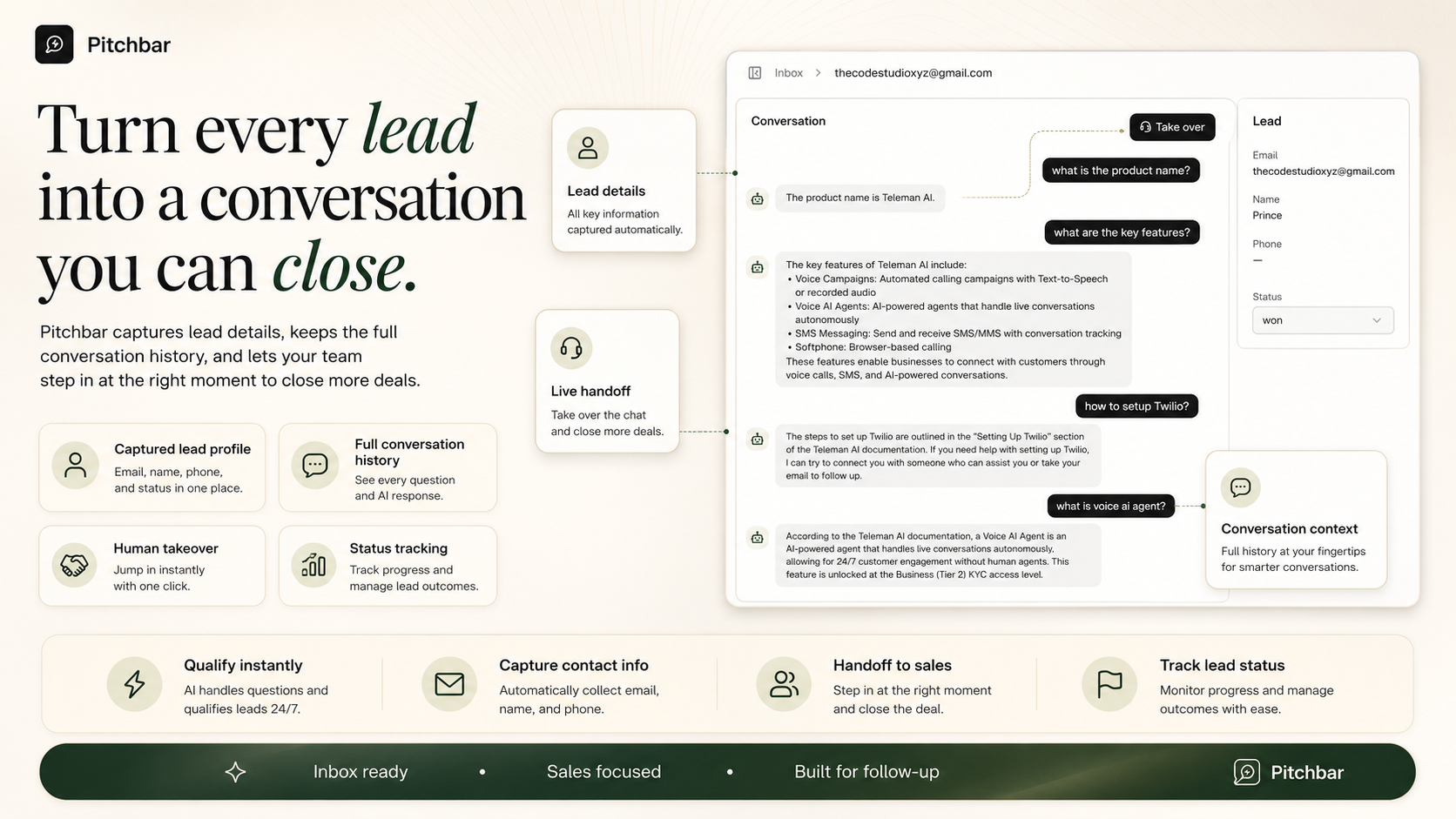
- Operator inbox shows captured leads and active conversations live, powered by Laravel Reverb (WebSocket).
- One-click Take over on any thread — the AI pauses, the visitor sees a “Human is here” badge, every reply you type streams to them in real time.
- Hand back to the bot when you’re done — seamless transition, no thread duplication.
- Full conversation transcript attached to every lead automatically.
- Live in-app toast + optional browser-push notification on every lead capture so workspace owners on the dashboard never miss one.
4. Lead capture, form builder & intent detection
- Custom form builder — per-agent schema with text / email / tel / textarea / select / checkbox fields. Drag-to-reorder, four starting presets (Classic, B2B SaaS, Support, GDPR-friendly), inline label / placeholder / required editing.
- Four lead-form trigger strategies per agent — Engagement (default, intent + turn count), First message (every visitor sees the form on turn one — best for sales-led agents), Keyword only (no surprise prompts), and Never (chat without lead capture).
- Pre-chat name + email gate — optional per-agent toggle that asks for the lead before the chat surface unlocks. Higher capture rate; the same schema renders in both the gate and the inline form.
- Captured leads land in the inbox immediately and fire HMAC-signed outgoing webhooks for CRM integration.
- Reserved keys (email, name, phone) map onto Lead columns; everything else lands on the Lead’s fields JSON.
- Dedup on (agent, email) so the same person filling out twice doesn’t create two rows.
5. Workflows — scripted multi-step flows
- Visual canvas editor — drag-and-drop branching flows. Trigger node + step nodes wired with edges; branches fan out and reconnect visually.
- Linear form editor — same workflow round-trips to a flat keyboard-friendly form for simple cases.
- Six step types: message, question, branch, tag_lead, webhook, escalate.
- Branching with equals / contains / starts_with / is_empty / not_empty / default match operators on captured variables.
- Match modes any / all / exact on keyword triggers so flows fire on the right intent.
- Variable interpolation — {{var_name}} in any message resolves the captured value at runtime.
- Loop-guarded engine — 32 jumps max per turn so a malformed graph can’t hang.
- Workflows scope to one agent or workspace-wide.
6. Customisation that doesn’t need code
- Persona, tone, system prompt — all editable from the dashboard.
- Theme: primary colour, accent colour, corner radius, launcher position, custom launcher label.
- Live preview of the visitor-facing widget while you edit.
- Up to six starter prompts shown as chips above the input on first open.
- Eight languages out of the box: English, Spanish, French, German, Portuguese, Japanese, Arabic, Chinese — auto-detected from the visitor’s browser.
- Behaviour rules: scroll-depth, idle, exit-intent, time-on-page, abandoned-cart, intent-keyword triggers — each fires on its own cooldown so multiple stack cleanly.
- Curated answers for pricing or refunds where you can’t risk paraphrasing — short-circuit the LLM with hand-written replies.
- Up to three CTA cards stacked per reply — define multiple CTAs with priorities and the matching ones render together (Pricing + Demo + Docs side by side). Each opens a URL, sends a message, captures a lead, or dismisses.
7. Analytics & knowledge gaps
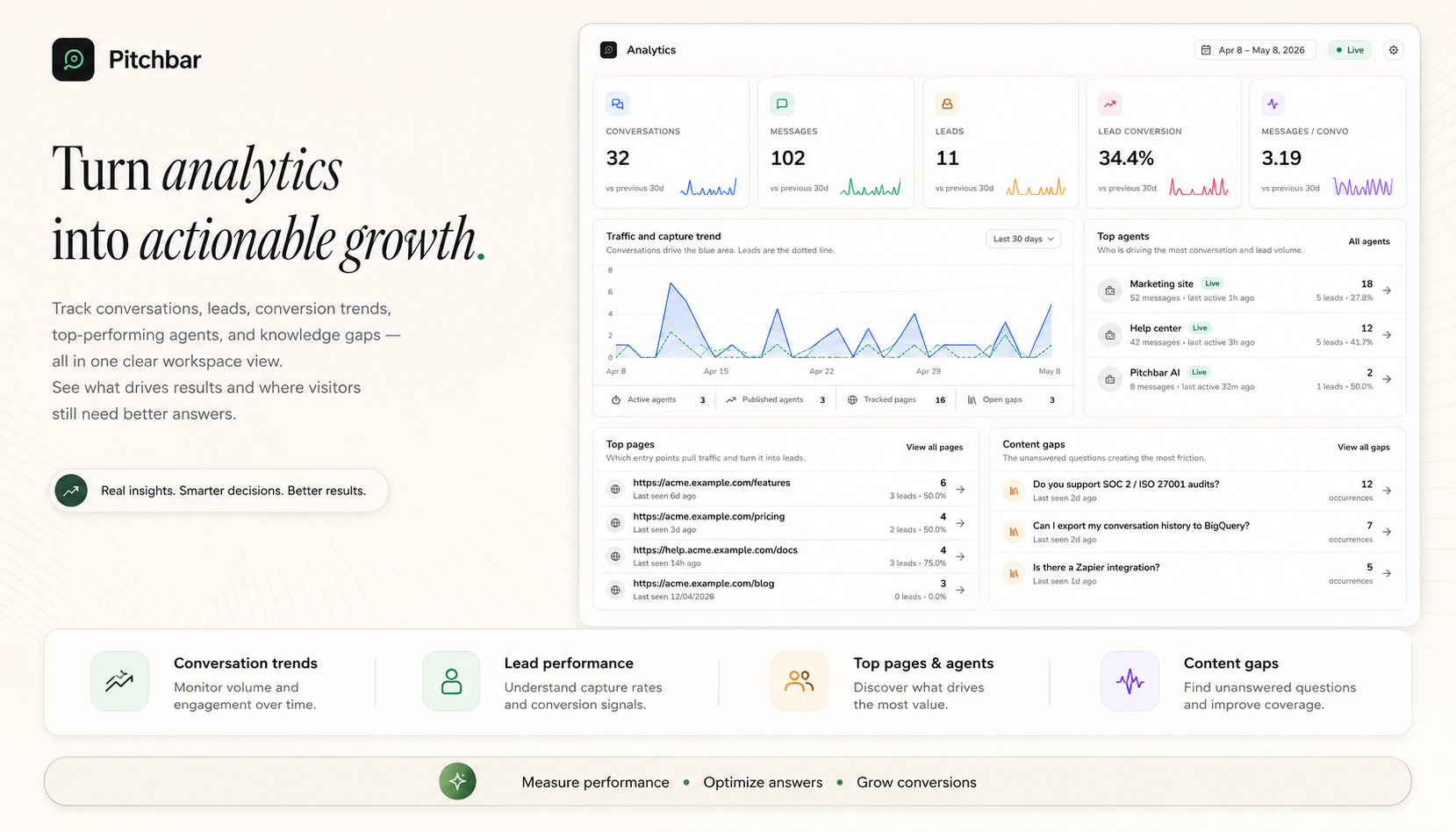
- Dashboard with conversation volume, deflection rate, lead conversion, average response latency.
- Knowledge gap detection — the system clusters questions visitors asked that the agent couldn’t answer, giving you your content roadmap automatically.
- Per-source citation effectiveness — see which knowledge sources actually drive answers and which never get cited.
- CSV export for everything.
8. Multi-tenant workspace model
- Each workspace is fully isolated — agents, conversations, leads, sources, analytics never cross the boundary.
- Four workspace roles: Owner, Admin, Editor, Viewer — granular capabilities for managing agents, members, billing, knowledge.
- Email invitations with 7-day expiry, accept-or-revoke from the same page.
- Owner transfer with two-step confirmation.
- Workspace switcher in the sidebar for users who belong to multiple.
9. Subscription billing — Stripe synced
- Platform admins create plans in Pitchbar — Stripe Products and Prices are created automatically.
- Monthly + annual billing toggle on the pricing page with auto-calculated savings; interval=year Checkout flow.
- Per-plan AI rate-limit + max-tokens dials enforced server-side.
- Price changes archive the old Stripe Price and create a new one (no breaking existing subscriptions).
- Customer portal access for cancellations, card updates, invoice history.
- Metered enforcement — workspaces blocked from starting new conversations once the monthly quota is reached. Existing conversations and human takeovers continue.
- Branding-removal feature flag per plan.
- 30-day money-back guarantee shipped as a configurable copy block.
10. Platform admin console
- Operator-only surface at /admin — gated by a super-admin role flag.
- Workspace browser, user list, agent list, conversation log across all tenants.
- Plan CRUD with one-click Stripe sync per row.
- Subscription overview with revenue context.
- Usage metering: month-over-month conversation count by workspace.
- Site Health pill with seven automated checks (failed jobs, Stripe, LLM provider, vector store, mail, Reverb, cache).
- Lead-email pipeline test button — exercises mail driver + queue worker + email template end-to-end.
- Failed-job inspector with retry / forget / retry-all controls.
- Impersonate any user with a banner so you can support customers without asking for their password.
- Global search across workspaces, users, agents, conversations, leads.
- Buyer-facing changelog authoring at /admin/changelog — drafts publish to a public /changelog page with a dismissable “what’s new” banner inside the dashboard.
11. Integrations
- WordPress & WooCommerce — official companion plugin (PHP 7.4+, WordPress 6.4+). One-click content sync for posts, pages, custom post types, and WooCommerce products. Page-builder rendering for Elementor, Beaver Builder, Oxygen, Bricks, Divi. WooCommerce order lookup, coupon emission & apply, abandoned-cart trigger. Resumable sync that survives shared-hosting timeouts. Bundles a standalone documentation.html for offline reference. Ships with an English + Simplified Chinese translation pack out of the box.
- Connected sites surface — every WordPress install that connects to one of your agents is listed in the Integrations page (URL, plugin version, WooCommerce status, last-seen timestamp).
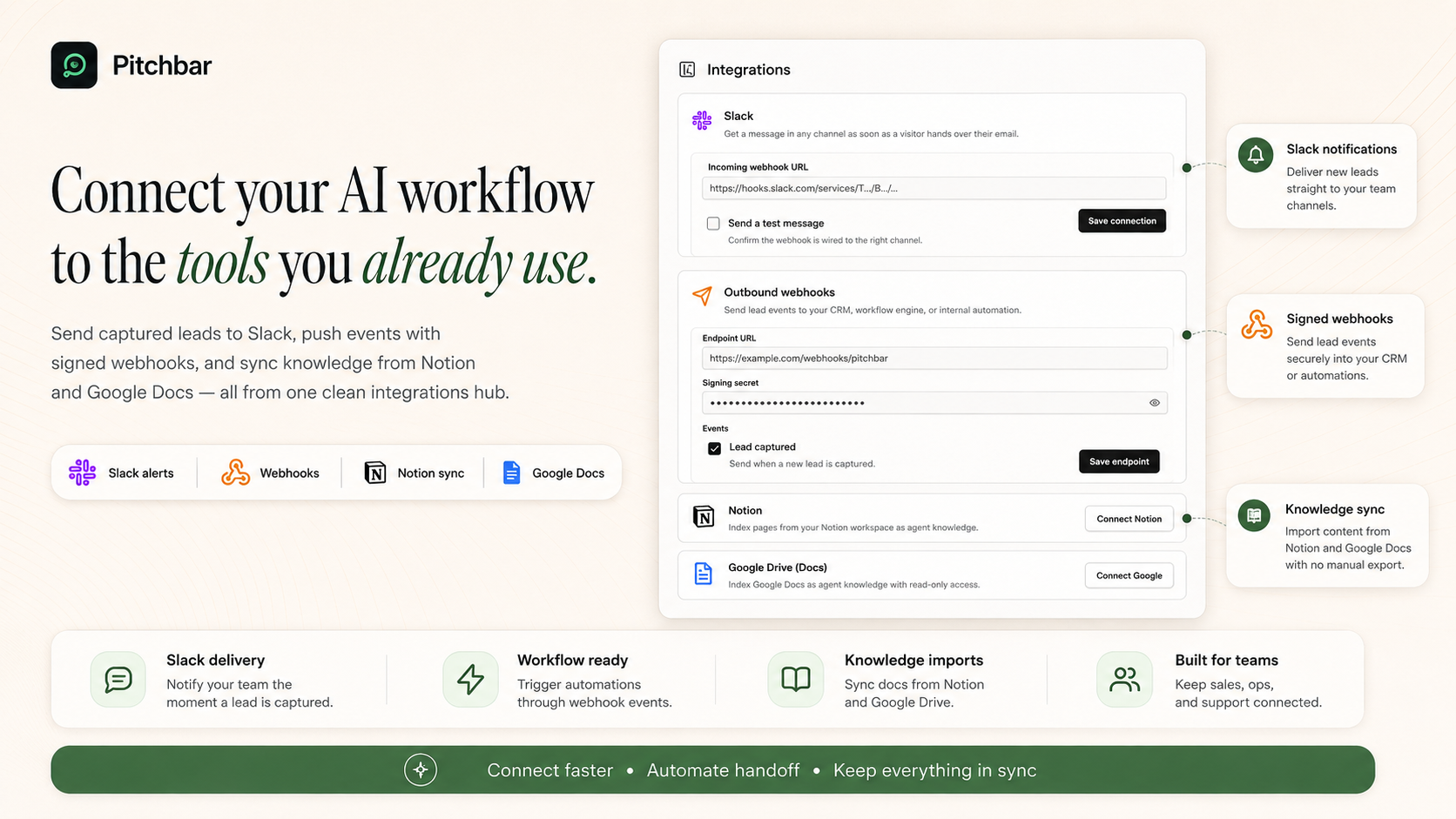
- Notion — OAuth, ingest pages or databases as knowledge sources.
- Google Docs — OAuth, ingest documents from Drive.
- Slack — outgoing notifications for leads, low-confidence escalations, and routed conversations.
- Stripe / PayPal / Razorpay — Cashier-backed subscription billing on Stripe, plus first-class PayPal and Razorpay support. Auto-synced products and prices, webhook signature verification on every gateway.
- Outgoing webhooks — HMAC-signed POSTs to your endpoint for every captured lead. Use it as a Zapier catch-hook to fan into HubSpot, Salesforce, Mailchimp, Pipedrive — anything.
12. Built-in marketing site & SEO
- Landing page with hero, video, feature grid, growth chart, testimonial carousel (auto-advance), 10-question FAQ accordion, and final CTA — every section editable from Settings → Marketing.
- Per-page SEO meta on every public route — title, description, canonical URL, Open Graph card, Twitter card.
- JSON-LD structured data — Organization on every page, SoftwareApplication on home, FAQPage sourced live from your editable FAQ items so Google’s rich-result picker renders Q+A directly.
- Auto-generated /sitemap.xml covering every marketing page, every doc slug, every published changelog entry.
- Smart /robots.txt — allows public surfaces, disallows admin / app / api / settings.
- Custom Open Graph image — drop a 1200×630 PNG at public/og-image.png.
13. Built-in documentation site
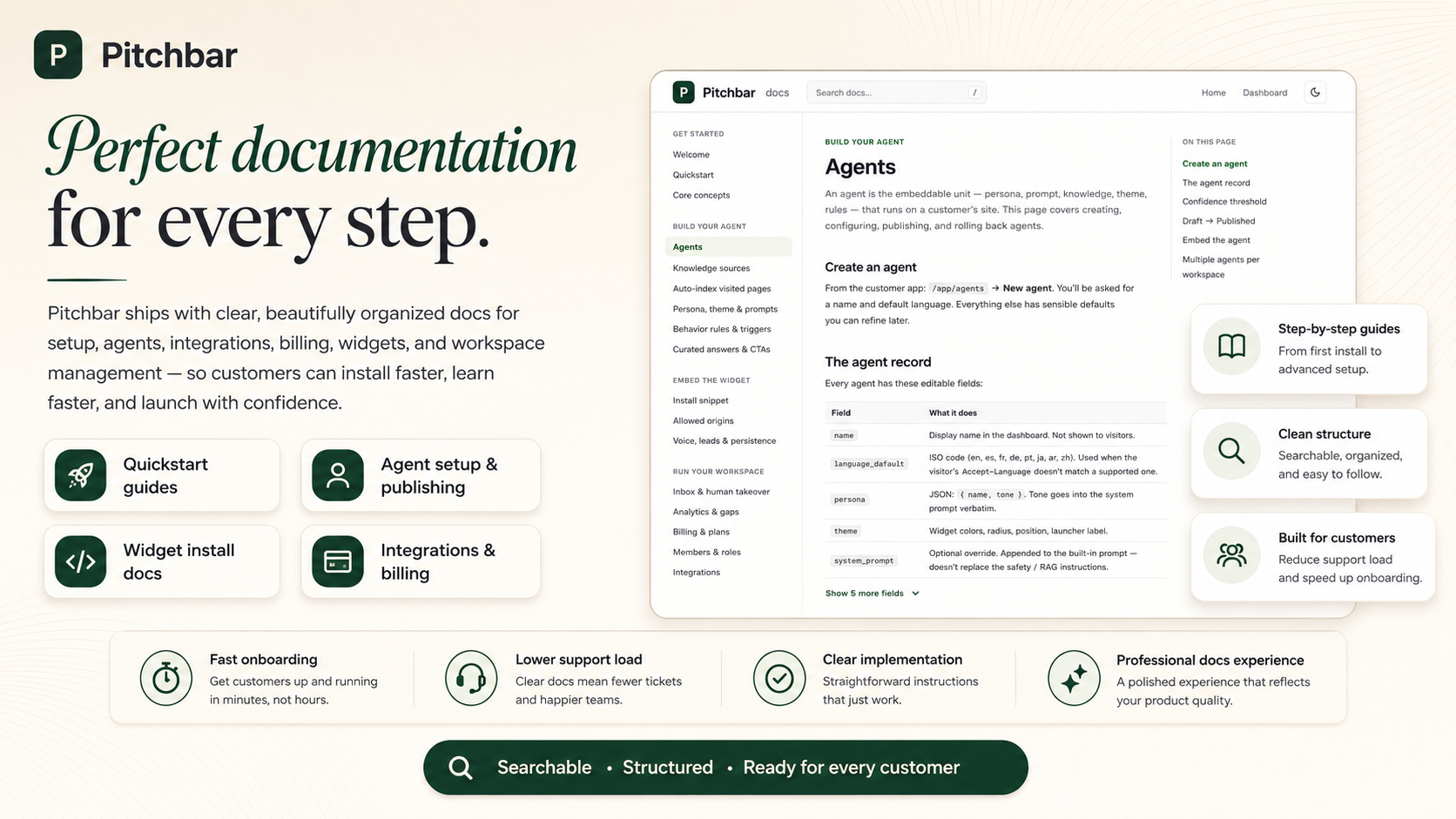
- Mintlify-style reference shipped at /documentation — 40+ pages covering every feature, the widget API, the architecture, security, deployment, white-label audit, SEO surface.
- Self-host installation guide at /documentation/installation — 20–40 minutes from a fresh server to a running deployment. Requirements, environment variables, database, asset build, Octane/Horizon/Reverb processes, cron (host or one-click Cloudflare Worker), first admin via the bundled artisan command, smoke test, common troubleshooting.
- Seven dedicated WordPress & WooCommerce docs pages covering Overview, Install & connect, Content sync, Page builders, WooCommerce deep links, REST API reference, Troubleshooting.
- Light and dark themes, on-page table of contents, search, code-copy buttons.
- Operators can rebrand it via the admin settings and ship docs under their own domain.
What’s Inside the Stack
- Backend: Laravel 13 (PHP 8.3+), Octane on FrankenPHP, Reverb (WebSocket), Horizon (queue), Cashier (Stripe), Fortify (auth), Sanctum (API tokens).
- Database: MySQL 8 / Postgres 16 — both supported via standard Laravel database drivers.
- Cache, queue, sessions: Redis 7.
- Frontend admin: Inertia v3, React 19, TypeScript (strict mode), Tailwind v4, shadcn/ui (Radix primitives), Wayfinder for typed routes, React Flow for the workflow canvas.
- Visitor widget: Preact 10 + Vite, isolated build, ≤ 50 KB gzipped, Shadow DOM rendered.
- AI providers (preferred): Cloudflare Workers AI (Llama 3.x chat + bge-base embeddings), Cloudflare Vectorize (vector store), Cloudflare Browser Rendering (crawler).
- AI providers (fallback): OpenAI gpt-4o-mini + text-embedding-3-small, OpenRouter, Qdrant, Browserless. One env var swaps providers.
- Object storage: S3-compatible (Cloudflare R2 by default).
- Tests: Pest 4 — 1,289 feature + unit tests shipped.
- Observability: Sentry, OpenTelemetry traces wired through the hot path.
Server Requirements
- PHP 8.3 or newer (8.4 supported).
- MySQL 8+ or Postgres 16+.
- Redis 7+ (cache, queue, sessions).
- Composer 2.x and Node.js 20+ (for build).
- A web server able to serve a Laravel application — Nginx, Apache, FrankenPHP, or any managed Laravel host.
- An LLM provider key — Cloudflare Workers AI (cheapest), OpenAI, or OpenRouter.
- A vector store — Cloudflare Vectorize (recommended) or self-hosted Qdrant.
- Stripe account if you want to bill customers (free tier works for testing).
- SMTP / Postmark / Resend / Mailgun / SES for transactional email.
- Optional: Cloudflare account for Browser Rendering (best crawl quality on JS-heavy sites).
Total external infrastructure cost on Cloudflare’s “one-bill” mode: starting at ~$5/month on a small VPS plus Cloudflare’s per-request usage tier.
Security & Privacy
- Strict origin enforcement on the public widget — empty allow-list means deny everywhere; subdomains never inferred. Stops third parties from embedding your snippet on their site.
- Restricted paths — buyer-side per-agent path glob list keeps the widget off /admin, /checkout, /account flows without code.
- Auth-aware widget suppression — the marketing demo widget never mounts on signed-in admin or customer pages, server-side, can’t be misconfigured.
- Prompt-injection defence — retrieved content is wrapped in <source> tags and the system prompt instructs the model to treat them as data, never instructions. Regression-tested.
- SSRF protection — the crawler refuses to fetch private IP ranges, loopback, link-local, and cloud metadata endpoints.
- Encrypted at rest — OAuth tokens, Stripe secrets, mail passwords, custom LLM keys all use Laravel’s encrypted casts.
- Rate limiting on every public endpoint — per-IP for init, per-JWT for messages and leads.
- Stripe webhook signature verification, HMAC-signed outgoing webhooks, CSRF on every authenticated form.
- Two-factor authentication via TOTP, recovery codes, all standard Fortify auth flows included.
- Audit log for every privileged action — admin changes, plan changes, member changes, ownership transfers, impersonation.
- White-label audit checklist shipped at /documentation/whitelabel-audit for reviewing every customer-facing surface before each release.
Multi-language
The widget auto-detects the visitor’s preferred language from their browser and replies in it. Supported out of the box:
- English — en
- Spanish — es
- French — fr
- German — de
- Portuguese — pt
- Japanese — ja
- Arabic — ar (RTL)
- Chinese — zh
The system prompt instructs the model to translate retrieved sources but keep numbers, prices, and proper nouns verbatim.
The WordPress companion plugin also ships with a Simplified Chinese (zh_CN) translation pack — when you set a WordPress site or user locale to 简体中文, the Pitchbar plugin admin renders in Chinese automatically. More plugin translation packs land in later releases.
Frequently AskedCan I use this for my client’s site?
Yes. The Regular License covers a single end product (a single deployment). For agency use across many client sites, the Extended License grants the resale and white-label rights you need.
Will it work on WordPress / Shopify / Wix / Squarespace?
Yes — the widget is a single <script> tag, framework-agnostic. Any platform that lets you paste HTML before </body> can run Pitchbar. WordPress: paste in your theme’s footer.php or use a “header/footer code” plugin. Shopify: paste in theme.liquid. Squarespace: Settings → Advanced → Code Injection → Footer.
How accurate are the answers?
The agent answers only using the knowledge sources you’ve added. If the answer isn’t in your sources, it says so plainly and offers to capture the visitor’s email instead of making something up. The confidence threshold is configurable per agent.
Can I customise the look of the widget?
Yes — primary colour, accent colour, corner radius, launcher position (centered bar, bottom-right bubble, or bottom-left), launcher label, persona, tone, and starter prompts are all configurable from the dashboard with a live preview. The “Powered by” footer can be removed on paid plans.
Do I need a Cloudflare account?
Recommended but not required. Cloudflare Workers AI is the cheapest AI path and handles chat, embeddings, vector search, and crawl in one bill. If you prefer OpenAI, set OPENAI_API_KEY and VECTOR_PROVIDER=qdrant — same features, different pricing.
What about data privacy?
Pitchbar is self-hosted — visitor messages, captured leads, and knowledge content live on your infrastructure. The only third party that sees the content is your chosen LLM and vector provider. You control retention, encryption, and deletion.
Can I run multiple agents per site?
Yes — embed multiple <script> tags with different data-agent-id values. One agent per workspace can run on the same domain.
Does it scale?
Yes. The hot path is engineered for <1s p95 time-to-first-token. Async persistence, Redis caching for retrieval and conversation history, queue-driven crawling and indexing — the architecture handles thousands of concurrent visitors per server.
All buyers within the major version get every release for free.
Ready to Ship
Pitchbar is production-ready software, not a starter kit. Every page is polished, every feature is documented, every endpoint is tested. The hot-path latency is engineered, the multi-tenancy is enforced by tests, the security defaults are tight.