
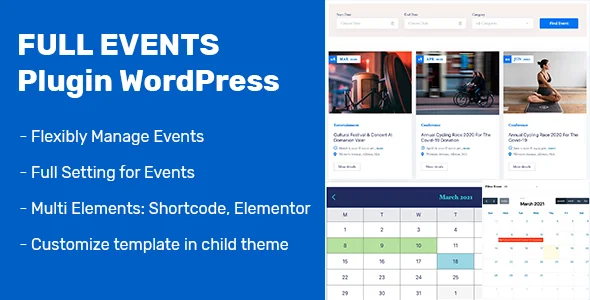
Event Management WordPress Plugin
Event plugin WordPress is a fully functional plugin that can work with all WordPress themes, easily setup and customize without any coding skills.
The plugin supports event organisers displaying their event listings in an attractive way to grab attendees’ attention. Besides, it provides outstanding features to optimize users’ experience: advanced event search filter, AJAX filter, simple calendar and full calendar, slide …
Single Event View
Our beautiful view for a single event makes a strong impression on customers at the first look. The page offers detailed information regarding the event title, organizer’s name, date, time, venue, location of the event and brief description.
Event Template Page Builder
You can build template of event detail in Elementor Page Builder. The plugin support full elements for build template. You can read documentation for detail.
Event Listing Layouts
Event listing layout options we supply help to enhance user experience by letting them choose the way event listings appear on the site.
2 options we create:
- Event listing box layout: With this layout, listed events will be showcase with a large image that make events attractive.
- Event listing line layout: When visitors choose event listing line layout, event listing will be displayed in chronological order.
Besides, customers can select to show event listings with sidebar or no sidebar.
Advanced Search Form
Our advanced search form will support customers filtering events based on start date, end date and category with a or two clicks. Besiders, looking for events according to customers’ needs becomes more convenient with the ready to use calendar attached in “ start date ” field and “ end date ” field.
AJAX Filter Event
AJAX Filter gives users better experiences in searching events. You can find events that are suitable for your purpose without reloading the page.
Ajax Search Event
The customer can search event with start date, end date, Category and display result in page quickly.
User-Friendly Admin Dashboard Interface
You aren’t worried about coding skills when you use our user-friendly admin dashboard interface because with only some steps, you can easily create, edit, delete, cancel any event.
Add Event Category at Admin Dashboard
In Admin Dashboard, you can add unlimited categories such as music, sports, clubs, dance … and assign events to these categories. Therefore, when customers click on a particular category, all events assigned to that category will be shown.
Single Calendar and Full Calendar
We offer 2 calendar options for you to select:
- Single Calendar: In the single calendar, you can see which days events will take place. Besides, When you click on a particular day, the event listing of that day is displayed
- Full Calendar: With the full calendar, you can also see which days events will take place but you don’t need to click on a particular day to know which events take place on that day. All events are displayed right in this full calendar interface.
Compatibility with PHP 7.x, 8.xSupport RTLSupport Booking Event via WooCommerce
The customer can booking event via WooCommerce system, so you can use many payment gateway for checkout.
Change log
Version 1.3.2 – 11 November 2025Version 1.3.2 - Fix category slide shortcode - Update documentation Version 1.3.1 – 10 November 2025- Fix some shortcodes, elements Version 1.3.0 – 14 August 2025Version 1.3.0 - Fix search events & event widgets - Add filter hook query get events Version 1.2.9 – 13 May 2025- Fix language for date Version 1.2.8 – 09 May 2025+ Fix security Version 1.2.7 – 08 May 2025+ Fix security + Fix search event ajax Version 1.2.6 – 22 November 2024+ Fix tag in backend Version 1.2.5 – 12 September 2024- Fix Show End Date time. Version 1.2.4 – 29 July 2024+ Update UX backend Version 1.2.3 – 26 July 2024- Add Countdown Date. - Fix choose hour. - Update Options for Elements Version 1.2.2 – 24 January 2024- Fix load template in Divi Theme - Add filter for load template include. Version 1.2.1 – 02 January 2024- Improve some code Version 1.2.0 – 05 October 2023- Update some elements Version 1.1.9 – 03 August 2023- Add RTL - Add Category Element. - Add Booking via WooCommerce. Version 1.1.8 – 13 July 2023- Fix Slider Shortcode Ajax Version 1.1.7 – 06 June 2023- Add Search Event Filter Shortcode - Related Event: Add Filter display events (All, Past, Upcoming event) Version 1.1.6 – 21 April 2023- Update Compatibility with PHP 7.x, 8.x + Fix Search Event Version 1.1.5 – 05 April 2023Version 1.1.5 - Update calendar widget - Update first of week - Fix search event Version 1.1.4 – 06 October 2022Fix save event Version 1.1.3 – 09 September 2022Fix save event Version 1.1.2 – 22 July 2022Fix sort date in archive template Version 1.1.1 – 22 July 2022Fix sort date in archive template Version 1.1.0 – 16 June 2022- Update Elements compatibility with latest Elementor plugin Version 1.0.9 – 07 March 2022+ Fix show upcoming event Version 1.0.8 – 17 January 2022- Add Filter translate calendar - Add: Choose First Day in Calendar Version 1.0.7 – 15 November 2021- Add Booking Now Element in template - Fix smal problems. Version 1.0.6 – 18 October 2021- Fix Event Slide ShortCode - Fix Query setting in Event Archive Version 1.0.5 – 26 August 2021Allow change event template in per event. Version 1.0.4 – 26 August 2021+ Allow create event template in Elementor Page Builder + Create Shortcode/Element Search Ajax Version 1.0.3 – 16 April 2021- Add template for Event Element Version 1.0.2 – 31 March 2021- Fix some small bug - Optimize code Version 1.0.1 – 24 March 2021- Fix error general CSS in PHP
Published:
Jan 09, 2026 06:24 PM
Category:
High Resolution:
NoFiles Included: